
For data engineers
A release check for every delivery your pipeline loads.
Compare each new file or table with the version you approved. Get a verdict and an exit code, and let your pipeline decide what happens next. No rules file to write first.
Sound familiar?
The job went green. The data didn't.
A supplier renamed a column and the load still succeeded.
Our tests check what we thought of. The break is always something else.
Writing and maintaining checks for every column of every feed never ends.
What you get
Built for the way deliveries actually arrive.
Gate the load on the data, not the job
One command compares the new delivery with the approved version and exits with a code your orchestrator understands. Add a JUnit file and the findings appear in your CI's test view.
- Runs on Windows and Linux:
datainspec.exeships with the Windows installer, and the same engine runs on Linux or in Docker - The app's Gate tab exports the exact command for your job
# in your job, after the extract
datainspec scan \
  --baseline  orders_september.parquet \
  --candidate orders_october.parquet \
  --profile   orders.profile \
  --output    report.json \
--junit-xml report.xml| 0 | Clearnothing that needs attention |
|---|---|
| 1 | Warningfindings worth a look |
| 2 | Blockeda critical finding |
| 3 | Failedthe scan itself could not run |
Know exactly what broke
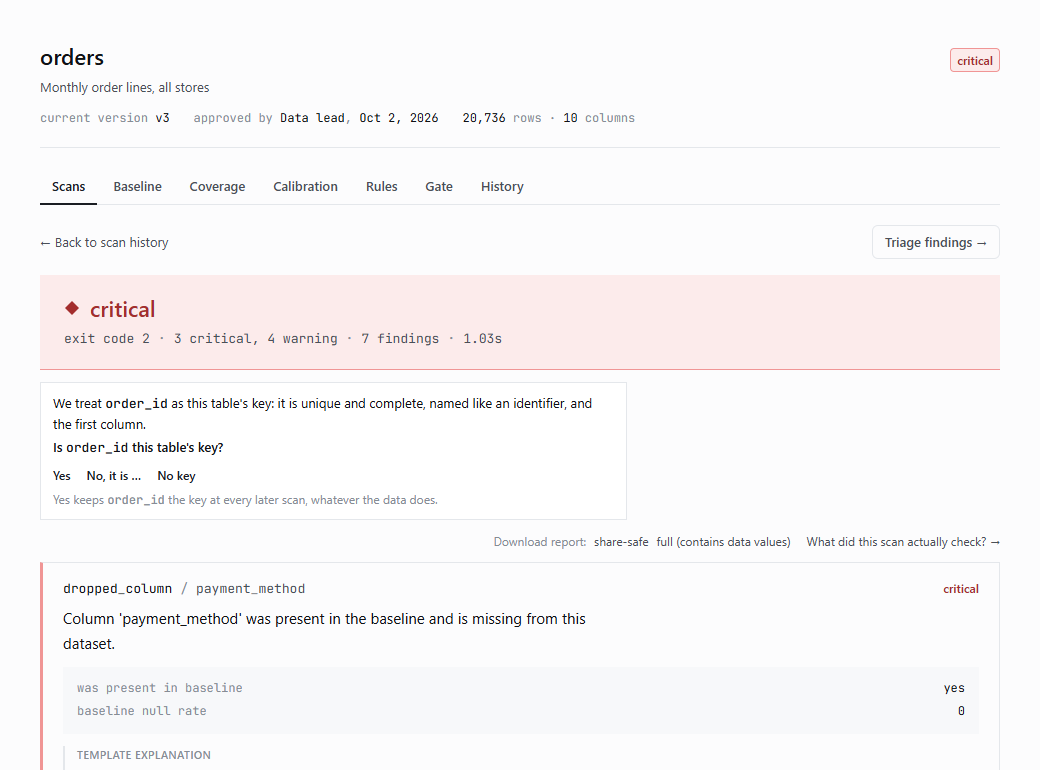
The JSON report holds every finding in plain words, with its evidence and the rows behind it, so you start from the cause instead of debugging back from a dashboard.
- Each finding names the column and what changed
- Sample rows, exportable in full
- A share-safe form for tickets outside the team
No rules to start, full control when you want it
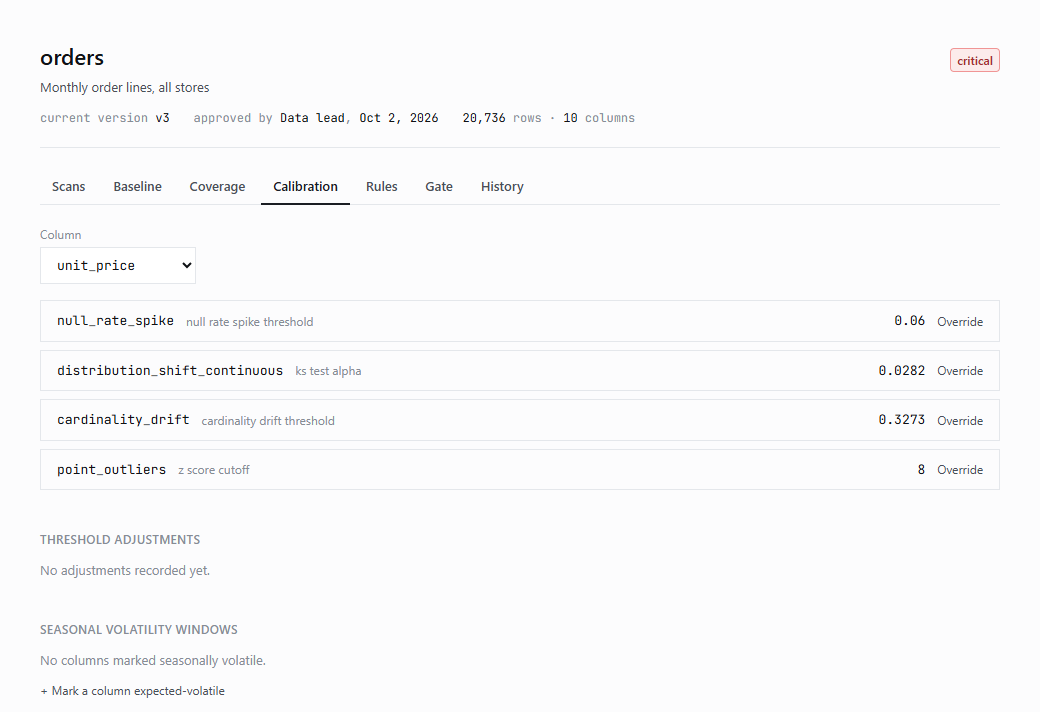
It profiles every column of the version you approve: its role, its normal range, the checks that fit. Every threshold is visible and can be overridden with a reason.
- Cache the profile with
--profile - Ranges, allowed values and the key in YAML
- Import what you wrote for dbt or Great Expectations
Reads the files people really send
Files and tables as they are: a folder of CSV parts, Parquet, DuckDB, SQLite, or a database through its driver with the read-only SELECT you give it. Excel-style CSVs included.
- 30 million rows a side in about 21 minutes on a laptop
- Memory estimated before a big scan
- separator
- auto · comma · semicolon · pipe · tab
- encoding
- auto · utf-8 · Windows-1252 · ISO-8859-1/15
- decimal
- auto · point · comma
- dates
- auto · day-month · month-day
- size
- memory estimated before the scan
How it fits your pipeline
One more step, after the extract.
- 1The delivery landsA supplier export, a partner file, a nightly table.
- 2Your job runs the scanAgainst the approved version, with the cached profile.
- 3Exit code decides0 and 1 carry on; 2 holds the next step; 3 says the scan itself failed.
- 4Someone triagesIn the app: real problem, expected change or noise. The decision follows the finding to the next scan.
The difference
Tests you wrote, plus a check of everything else.
Questions
What engineers ask.
Does it need a server or a database of its own?
No. It runs on the machine it is installed on and reads your files and databases where they are. Its own records live in a working folder on that machine.
How long does a scan take?
It depends on the size. A million rows a side took about 35 seconds on a laptop; France's company register, 30 million rows a side, took about 21 minutes.
What does exit code 3 mean?
The scan itself could not run, for example a missing file. Your pipeline can treat it differently from a block.
Does it change my data?
No. It only reads: DuckDB and SQLite are opened read-only, databases get a read-only session, and every query passes a guard that refuses writes and multiple statements.
Put it in front of one feed.
Pick the delivery that hurts most. We set it up on your machines and review what it caught together.